Couic Report
couic-report is a lightweight webhook endpoint implementation designed to receive telemetry reports from Couic instances and send aggregated statistics via notifications. Unlike logging individual reports, it batches incoming data and periodically dispatches summary statistics to configured notifiers.
The service implements a trait-based notification system, with Discord as the first supported backend. This architecture makes it easy to add additional notification channels (Slack, email, custom webhooks, etc.) by implementing the Notifier trait.
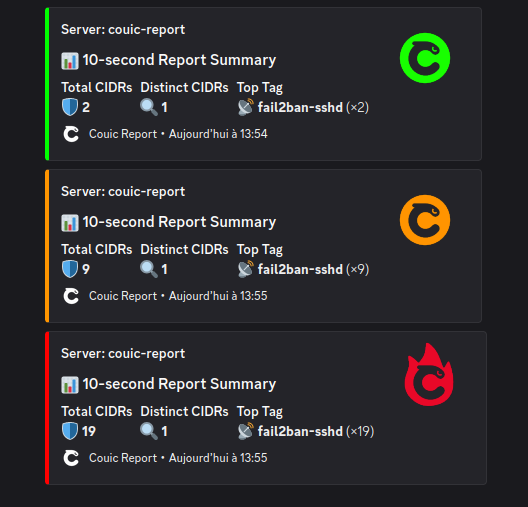
couic-report is an optional component provided as an example implementation. You can use it as-is for development/testing, extend it for production use, or implement your own webhook endpoint following the same patterns.Architecture
couic-report is a simple HTTP server that:
- Receives POST requests containing JSON arrays of reports from Couic instances
- Validates the request format and authentication
- Aggregates reports over a configurable batch interval (e.g., 15 minutes)
- Computes statistics (total count, distinct CIDRs, top tags)
- Dispatches aggregated statistics to configured notifiers (currently Discord)
- Returns appropriate HTTP status codes
Data Flow
┌─────────┐                ┌──────────────┐                ┌──────────┐
│  Couic  │ ─── POST ────> │ couic-report │                │ Discord  │
│Instance │   (reports)    │   /webhook   │                │ Webhook  │
└─────────┘                └──────┬───────┘                └─────▲────┘
                                  │                              │
                                  │ Aggregate                    │
                                  │ (batch_interval)             │
                                  │                              │
                                  └──────── Statistics ──────────┘
                                        (every 15min default)
Aggregated Statistics
For each batch interval, couic-report computes and sends:
- Total count: Number of filtering actions during the period
- Distinct CIDRs: Number of unique IP ranges affected
- Top tag: Most frequently triggered filter tag and its count
- Color coding: Visual indicators based on configurable thresholds (green/orange/red)
Notification System
The service uses a trait-based architecture for extensibility:
Notifiertrait: Defines the interface for sending statisticsDiscordNotifier: Current implementation using Discord webhooksNotificationDispatcher: Manages multiple notifiers simultaneously
Future notifiers (Slack, email, Prometheus, etc.) can be added by implementing the Notifier trait.
Installation
Pre-compiled Binaries and Packages
Pre-compiled binaries, Debian (.deb) and RPM (.rpm) packages are available for download in the Releases section of the project on Github.
The easiest way to deploy couic-report is to use the pre-compiled packages. The following sections use the Debian package as an example.
Installing the Debian Package
Debian package installation:
sudo dpkg -i release/couic-report_1.0.0-1_amd64.debThe service needs to be configured before you can enable and start the systemd service.
# Couic Report Configuration

# Batch interval in seconds - how often to send accumulated reports to notifiers
# Default: 900 (15 minutes)
batch_interval_secs = 900

[server]
# Server display name (used in notifications)
name = "production-server"

# Server listening address
addr = "127.0.0.1"

# Server listening port
port = 8000

# Webhook secret (must be a valid UUID)
# This secret is used in the endpoint URL: POST /v1/reports/{secret}
# Generate a UUID with: uuidgen (Linux/Mac) or [guid]::NewGuid() (PowerShell)
secret = ""

[thresholds]
# Orange threshold - number of reports to trigger orange alert
orange = 10

# Red threshold - number of reports to trigger red/critical alert
red = 100

# Minimum threshold level to trigger notifications
# Valid values: "green", "orange", "red"
# - green: notify on all batches (even with 0 reports)
# - orange: notify only when reaching orange threshold or above
# - red: notify only when reaching red threshold
# Default: "green"
threshold_min = "green"

[discord]
# Discord webhook URL - obtain from Discord channel settings > Integrations > Webhooks
# webhook_url = "https://discord.com/api/webhooks/YOUR_WEBHOOK_ID/YOUR_WEBHOOK_TOKEN"
Configuration Steps
Generate a webhook secret (if not already done)
uuidgenuuidgen
550e8400-e29b-41d4-a716-446655440000Configure Discord webhook
- Go to your Discord server
- Navigate to: Server Settings → Integrations → Webhooks
- Create a new webhook and copy the URL
- Paste it in the
[discord]section
Edit the configuration file
sudo vim /etc/couic-report/config.tomlRequired changes:
- Set
server.secretto your generated UUID - Set
server.nameto identify your server in notifications - Uncomment and set
discord.webhook_urlto enable Discord notifications
Enable and start the service
sudo systemctl enable couic-report
sudo systemctl start couic-report
Verifying Installation
You can verify couic-report is operational using systemctl:
sudo systemctl status couic-report● couic-report.service - couic-report
Loaded: loaded (/usr/lib/systemd/system/couic-report.service; enabled; preset: enabled)
Active: active (running) since Thu 2025-11-13 10:23:26 UTC; 2s ago
Invocation: 2925cf0dd9f4456a803fd08ad3dcd2ed
Main PID: 120756 (couic-report)
Tasks: 3 (limit: 2281)
Memory: 2.7M (peak: 3.5M)
CPU: 44ms
CGroup: /system.slice/couic-report.service
└─120756 /usr/bin/couic-report -c /etc/couic-report/config.toml
Nov 13 10:23:26 couic-01 systemd[1]: Starting couic-report.service - couic-report...
Nov 13 10:23:26 couic-01 systemd[1]: Started couic-report.service - couic-report.Configuring Couic Instance
Local Couic instance must be configured to send reports to couic-report. Add the following to your Couic configuration:
[reporting]
enabled = true
webhook = "http://127.0.0.1:8000/v1/reports/550e8400-e29b-41d4-a716-446655440000"
Replace the UUID in the endpoint URL with your configured server.secret value.